Yours Homeservice

Wired vs Wireless Indoor Cameras: Pros, Cons & Best Picks

The “wired vs wireless” debate has quietly become the most important indoor camera decision you’ll make in 2026. Picking the wrong one means dead batteries during break-ins, cable spaghetti behind your TV, or a camera that disconnects every time the microwave runs.

I’ve installed both kinds in three different homes over the past year — including one with concrete walls that made wireless installation a nightmare. Here’s a practical breakdown of wired vs wireless indoor cameras, with honest recommendations for each.

Quick Definitions (So We’re on the Same Page)

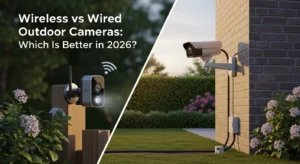
Wired indoor cameras are cameras that need a power cable plugged into a wall outlet, but transmit footage wirelessly over Wi-Fi. They are not fully wired (which would mean Ethernet too). Examples: Nest Cam, Ring Indoor Cam, Tapo C220.

Wireless indoor cameras run on rechargeable batteries and transmit over Wi-Fi. They have no cables at all. Examples: Arlo Pro 5, Eufy SoloCam, Blink Mini 2.

A small but important note: “PoE” cameras (Power over Ethernet) are technically the most wired option of all — one cable handles power and video. They’re enterprise-grade and more reliable than both options below, but rare in homes.

Wired Indoor Cameras: The Pros

  • Always on, never dies. A wired camera will record continuously for years without you doing anything.
  • Better video quality. Wired cameras can stream 24/7 in high resolution because they’re not budgeting battery life.
  • More features. Continuous recording, advanced AI processing, color night vision — all the heavy stuff works better with constant power.
  • Lower long-term cost. No batteries to replace, no charging cables, no downtime.

Wired Indoor Cameras: The Cons

  • Visible cable. Even with cable management, there’s a wire running from the camera to an outlet. Aesthetic compromise.
  • Limited placement. You’re stuck within a few feet of an outlet.
  • Power outage = blind spot. If the electricity goes out, your camera stops. (Some have small backup batteries.)
  • Slightly harder to install if you want to hide the cable inside a wall.

Wireless Indoor Cameras: The Pros

  • Place anywhere. Bookshelf, mantel, top of a fridge — no outlet needed.
  • Cleaner aesthetic. No dangling cables. Looks like a small ornament.
  • Easier to install — no drilling, no cable hiding.
  • Portable. You can move them between rooms or take them on holiday.

Wireless Indoor Cameras: The Cons

  • Battery anxiety. Most last 3–6 months on a charge with normal use, but heavy use drops that to 2–4 weeks.
  • Recording gaps. Most wireless cameras only record on motion, not continuously. You’ll miss things that happened “between” detections.
  • Slower wake-up time. Battery cameras “sleep” to save power. They take 1–3 seconds to begin recording when triggered. You can lose the first second of an event.
  • Higher long-term cost. Replacement batteries, charging time, and faster wear.

Side-by-Side Comparison Table

Factor Wired Wireless
Reliability Excellent Good
Video quality Higher Slightly lower
Installation Medium Easy
Placement freedom Limited High
Long-term cost Lower Higher
Aesthetic Cable visible Clean
Continuous recording Yes Rarely
Power outage immunity No Yes

Which One Should You Actually Buy?

Get a wired indoor camera if you want maximum reliability and continuous recording. Best for primary security spots — front door, hallway, living room. My pick: the Google Nest Cam (Wired) or the TP-Link Tapo C220 for budget.

Get a wireless indoor camera if placement freedom and aesthetics matter more than 24/7 coverage. Best for spots without nearby outlets, like a bookshelf or above a doorway. My pick: the Arlo Pro 5 for premium or the Blink Mini 2 for budget.

The Hybrid Approach (What Most Smart Homes Do)

Most well-thought-out home camera setups use wired cameras in primary rooms and wireless cameras for hard-to-reach spots. For example, a wired Nest Cam in the living room, a wireless Eufy on a bookshelf upstairs, and another wired one in the front entryway. This gets you the reliability of wired and the flexibility of wireless without compromising either.

Common Mistakes to Avoid

  • Buying a wireless camera and never charging it. (Yes, this happens a lot.)
  • Buying a wired camera and putting it in the perfect spot — only to realize the cable doesn’t reach.
  • Ignoring 2.4 GHz vs 5 GHz Wi-Fi compatibility. Most cameras need 2.4 GHz.
  • Using one camera for everything. Two cheaper cameras almost always cover a home better than one expensive one.

Final Thoughts

The wired vs wireless indoor cameras decision isn’t about better or worse — it’s about where you’re putting it and what you need it to do. Wired wins for reliability and image quality. Wireless wins for flexibility and aesthetics. Pick based on the room, not the marketing.

If you can only afford one camera and you want it to just work for the next five years, go wired. If you have a quirky home layout, go wireless. And if you have any sense, eventually go both.

Leave a Comment